

Overview
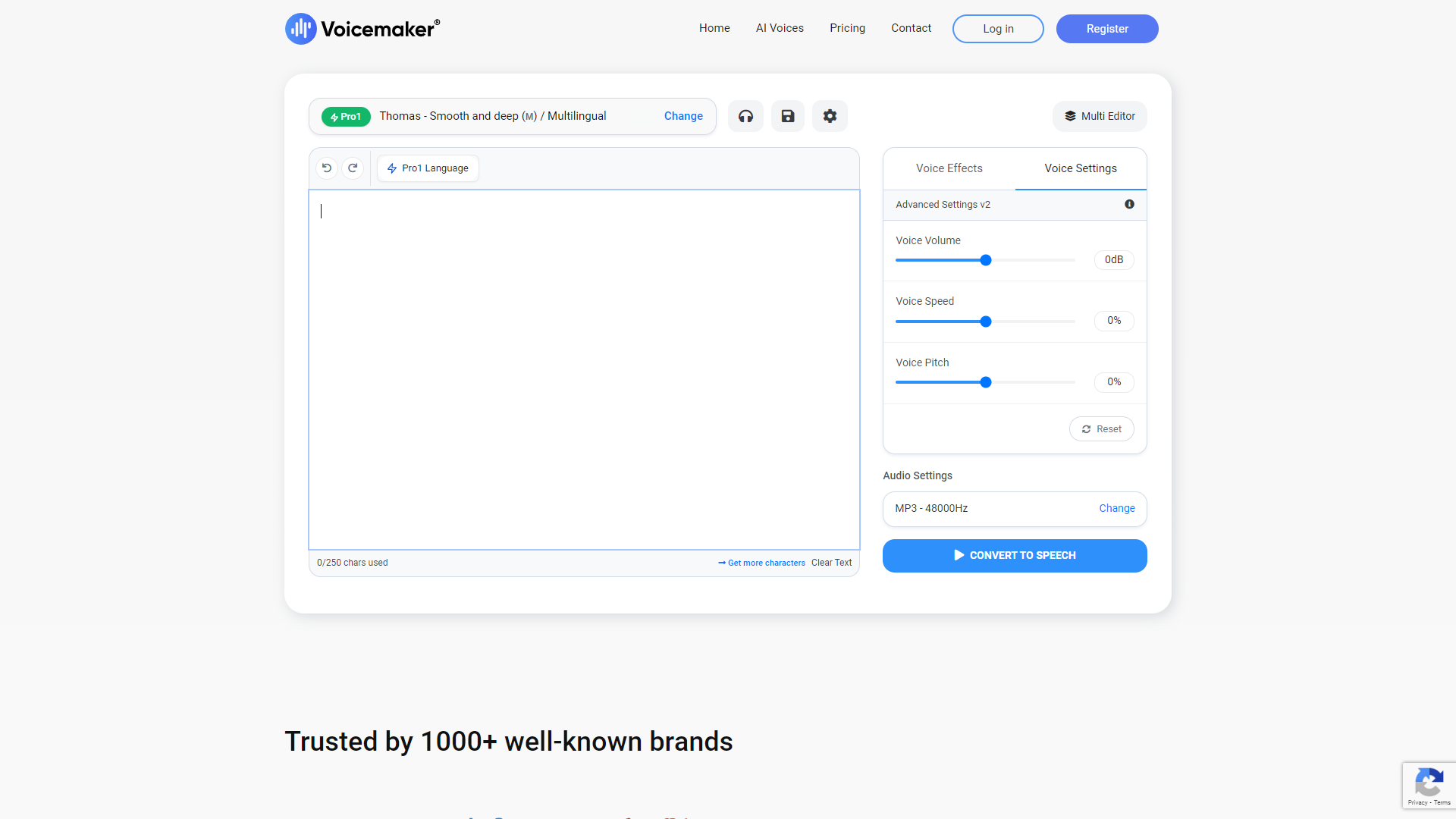
Voicemaker is a powerful text-to-speech tool designed for users who need high-quality audio quickly. With its user-friendly interface, even those with limited tech skills can easily create audio files from text. This makes it ideal for teachers, content creators, and businesses alike.
The tool offers a wide range of voice options and languages, enabling users to customize their audio projects according to their needs. Whether you want a friendly tone for a children's story or a professional voice for corporate presentations, Voicemaker has you covered.
Beyond simple audio creation, Voicemaker also supports advanced features like voice modulation and speed adjustments. This provides users with greater control over how their text is presented, making it a flexible solution for various applications.
Pros
- Easy to Use
- Quality Voices
- Versatile
- Regular Updates
- Affordable Pricing
Cons
- Limited Free Tier
- Internet Connection Required
- Voice Variation Needed
- Occasional Glitches
- Learning Curve for Advanced Features
Key features
Variety of Voices
Offers a large selection of voices in different genders and accents.
Multiple Languages
Supports text-to-speech conversion in multiple languages, catering to a global audience.
Customizable Settings
Allows users to adjust speed, pitch, and volume to match their preferences.
High-Quality Output
Generates crisp and clear audio that sounds natural and engaging.
User-Friendly Interface
Designed for ease of use, making the tool accessible to everyone.
SSML Support
Supports Speech Synthesis Markup Language for advanced audio effects.
Integration Options
Can be easily integrated with other applications via API for seamless usage.
Downloadable Files
Users can download their audio creations in various file formats.
Rating Distribution
Company Information
Screenshots
User Reviews
View all reviews on G2Voicemaker to the rescue
What do you like best about Voicemaker?
Voice maker is one of the important apps that help in text to speech converstion in an easy and effective manner. It has various benefits like:
1. It has a user friendly interface which is easy to navigate.
2. The voices generated by our natural sounding and ...
Voicemaker is a game changer especially for auditory learners.
What do you like best about Voicemaker?
What I like best about Voicemaker is its wide range of voices that you can choose from and customize it the way you want to according to your preference. The website is also very simple and easy to navigate, allowing first time users to learn the buttons with ...
Great product to give your videos life
What do you like best about Voicemaker?
I like the number of free voice selection. I can use multiple voices for male and female for my videos.
What do you dislike about Voicemaker?
I don't like the limit of character I can use in the free version. It can be a bit more. Also, it still feels like th...
My thoughts in AI voice
What do you like best about Voicemaker?
The best thing about it is that it is converts my words into voice, no need to record my voice it just convert my words into different kinds of voices
What do you dislike about Voicemaker?
Nothing as of now. It works very efficiently.
What problems is Voicem...
Really a great for text to speech AI that makes the new human voice for the videos
What do you like best about Voicemaker?
Creating a new impact on video speech, very easy to access.
number of free voice selection.
Male and female voices for the videos
We can customize it the way you want to according to preference
What do you dislike about Voicemaker?
Nothing form my side, just ...
Alternative Text To Speech tools
Explore other text to speech tools similar to Voicemaker





FAQ
Here are some frequently asked questions about Voicemaker.
What is Voicemaker?
Voicemaker is a text-to-speech tool that converts written text into natural-sounding audio.
How many voices does Voicemaker offer?
Voicemaker provides a wide variety of voices across different genders and accents.
Can I use Voicemaker for commercial purposes?
Yes, Voicemaker can be used for both personal and commercial projects.
Is there a free version of Voicemaker?
Yes, Voicemaker offers a free version, but it has limitations on features and audio length.
How do I convert text into speech?
Simply paste your text into the Voicemaker interface, select your desired voice and settings, then click to generate audio.
Can I adjust the speed and pitch of the voice?
Yes, you can customize the speed and pitch settings to fit your project's needs.
What file formats can I download my audio in?
You can download your audio files in several formats, including MP3 and WAV.
Does Voicemaker support different languages?
Yes, it supports multiple languages, making it accessible for a diverse audience.







