
TTS

VEED

VEED is a simple online video editing tool for everyone.

4.6 648 reviews G2 $18.00 Free version
Visit Website
VEED screenshot

Overview

VEED is a user-friendly online video editor designed for all skill levels. It allows users to edit videos directly in their web browser without needing to download any software. With its intuitive interface, VEED makes video editing accessible to beginners and professionals alike.

The platform offers a wide range of features, including video trimming, adding subtitles, and a variety of templates. Users can enhance their videos with effects, music, and transitions to create engaging content for social media or personal projects. Additionally, VEED supports many video formats, making it versatile for various needs.

One of the standout features of VEED is its collaboration tools. Teams can work together on projects in real-time, sharing ideas and making edits simultaneously. This makes VEED a great choice for businesses, content creators, and anyone looking to produce high-quality videos quickly.

Pros

  • Easy to Use
  • No Installation Needed
  • Great for Teams
  • Versatile
  • Regular Updates

Cons

  • Limited Free Version
  • Internet Required
  • Processing Speed
  • Occasional Bugs
  • Limited Control

Key features

User-Friendly Interface

VEED's design is simple and clear, making it easy for anyone to edit videos.

Online Editing

No downloads required, edit your videos directly in your web browser.

Subtitles and Captions

Automatically generate subtitles or add text to make videos more accessible.

Multiple Formats Supported

Works with many video formats, so you can upload and edit what you need.

Collaboration Tools

Allows multiple users to edit the same video at the same time.

Templates

Access a variety of ready-made templates to kickstart your projects.

Audio Editing

Adjust audio levels, add background music, and import sound effects easily.

Fast Exporting

Quickly export your videos in high quality, perfect for social media sharing.

Pricing

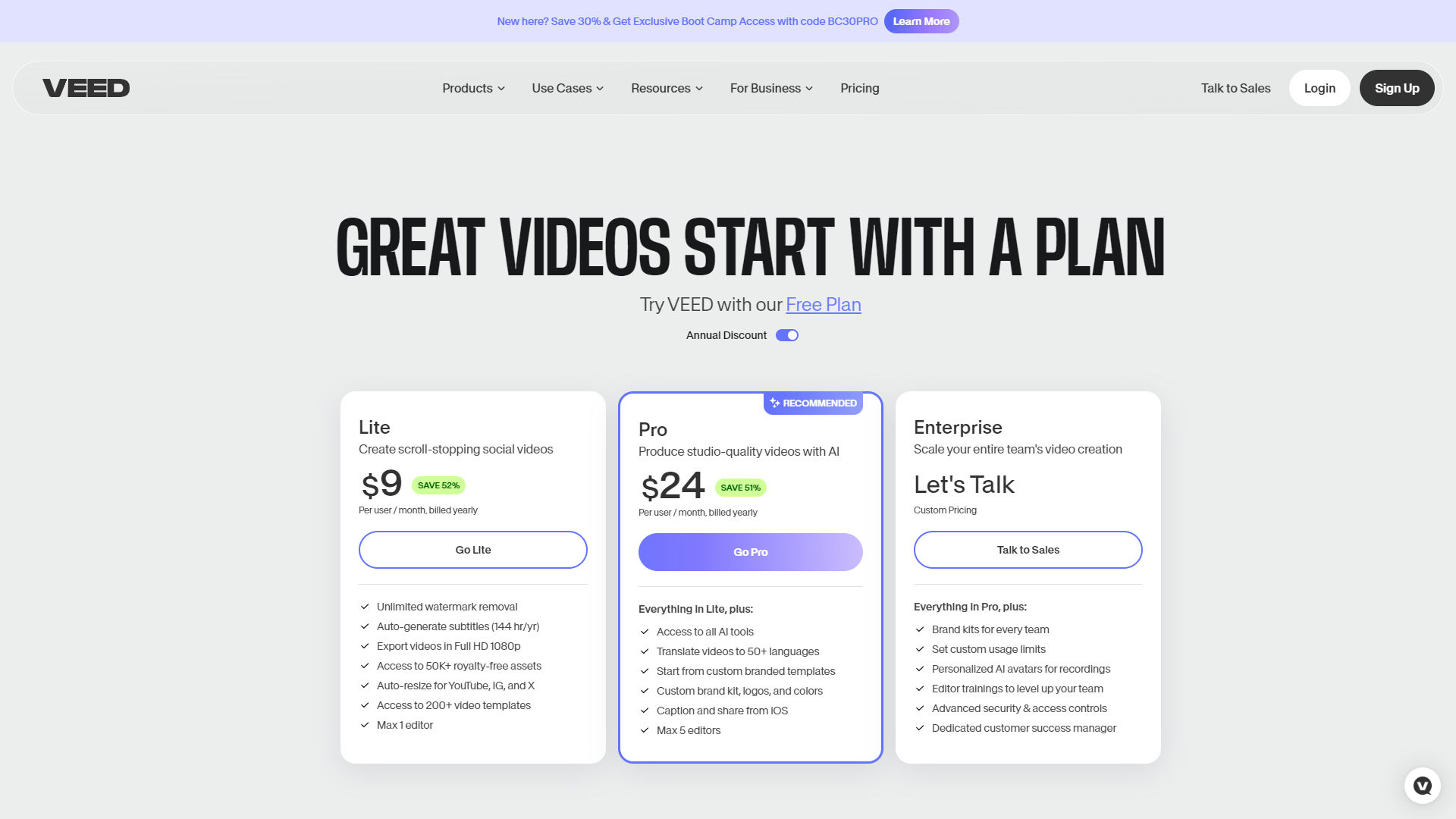
PlanPriceDescription
FreeFreeFor one-off projects that are under 10 minutes and need to be completed quickly.
Basic$18.00 (1 User Per Month)For individuals who want to create stunning, high-quality videos.
Pro$30.00 (1 User Per Month)For professionals who use video as a tool to grow and succeed.
Business$59.00 (1 User Per Month)For organizations that use video as a key part of their growth, communication, and teamwork strategies.
Enterprise$100.00For companies who want to scale video production while remaining on brand

Feature Ratings

Based on real user reviews, here's how users rate different features of this product.

Platform Basics

Screen Capture88%

Provides the ability to screen capture a still image of a user's full desktop, specific window or a small portion of the user's screen. This feature was mentioned in 162 VEED reviews.

Based on 162 reviews
Video Capture89%

Provides the ability to video capture a user's full desktop, specific window or a small portion of the user's screen. This feature was mentioned in 165 VEED reviews.

Based on 165 reviews
Image Editor77%

As reported in 157 VEED reviews. Allows users to edit and annotate screen captures and video captures with markup tools and image editing tools.

Based on 157 reviews
Slide Design80%

Based on 172 VEED reviews. Provides a variety of slide design tools, such as animations, icons and transitions.

Based on 172 reviews
Presenter Tools82%

As reported in 171 VEED reviews. Provides tools to help the presentation experience for both user and audience, including voice over narration and a presenter-only view with notes and annotations.

Based on 171 reviews
Auto Save91%

Provides an autosave option to prevent file loss. 177 reviewers of VEED have provided feedback on this feature.

Based on 177 reviews

Platform Content

Screen Record87%

Based on 163 VEED reviews. Helps users record a video capture and save it as a video file, audio file or GIF file.

Based on 163 reviews
Charts74%

Gives users a variety of chart and graph options that can be editied within the presentation. This feature was mentioned in 161 VEED reviews.

Based on 161 reviews
Template Library78%

Provides users with a pre-built library of useable slide templates. 168 reviewers of VEED have provided feedback on this feature.

Based on 168 reviews
Template Creator77%

Allows users to customize their own templates. 166 reviewers of VEED have provided feedback on this feature.

Based on 166 reviews
File Sharing84%

Provides robust sharing options. This feature was mentioned in 171 VEED reviews.

Based on 171 reviews

Platform Additional Functionality

File Sharing85%

Provides robust sharing and publishing options. This feature was mentioned in 161 VEED reviews.

Based on 161 reviews
Platform Search78%

As reported in 158 VEED reviews. Lets users search the platform for saved screen and video captures, as well as stock images.

Based on 158 reviews
Messaging76%

As reported in 163 VEED reviews. Contains in-application messaging abilities.

Based on 163 reviews
Mobility80%

Based on 162 VEED reviews. Is accessible from a mobile device and by users on the go.

Based on 162 reviews
Cloud83%

Provides a cloud based version of the platform This feature was mentioned in 163 VEED reviews.

Based on 163 reviews

Speech Output

Volume86%

Provide tools to modify volume of voice. 214 reviewers of VEED have provided feedback on this feature.

Based on 214 reviews
Speed84%

As reported in 212 VEED reviews. Provide tools to modify speed of voice.

Based on 212 reviews
Accent78%

Provide tools to modify accent of voice. 202 reviewers of VEED have provided feedback on this feature.

Based on 202 reviews
Emotion74%

Provide tools to modify emotion of voice, including happy, sad, and annoyed. This feature was mentioned in 206 VEED reviews.

Based on 206 reviews
Speaking Styles75%

Allow users to change the speaking style, such as newscaster or conversational. 204 reviewers of VEED have provided feedback on this feature.

Based on 204 reviews

Audio Format

Natural Sounding Voices77%

Allows users to create voices which sound natural and human-like. 203 reviewers of VEED have provided feedback on this feature.

Based on 203 reviews
Audio Format Flexibility80%

Gives users the ability to choose from a number of audio formats including mp3, Linear16, and Ogg Opus. This feature was mentioned in 201 VEED reviews.

Based on 201 reviews
Audio Optimization81%

Optimize for the type of speaker from which your speech is intended to play, such as headphones or phone lines. 201 reviewers of VEED have provided feedback on this feature.

Based on 201 reviews

Planning

Collaborative Editorial Calendars / Scheduling Content68%

Create editorial calendars that can be accessed by multiple users. Schedule content in advance to post at a later date. This feature was mentioned in 244 VEED reviews.

Based on 244 reviews
Scheduling Integration67%

Based on 224 VEED reviews. Create content plans or calendars for multiple users and schedule content in advance.

Based on 224 reviews

Editing

Audio Mixing79%

As reported in 486 VEED reviews. Enables audio clips to be added to videos

Based on 486 reviews
Transcription88%

As reported in 503 VEED reviews. Utilizes speech-to-text technology to generate transcripts that can be used as captions

Based on 503 reviews
Text Animation84%

Allows users to animate text and adjust text properties such as color, size, length, reflectivity, extrude, etc. This feature was mentioned in 503 VEED reviews.

Based on 503 reviews
Time Mapping80%

As reported in 481 VEED reviews. Allows users to make vides speed up, slow down, or reverse direction

Based on 481 reviews
Overlays and Watermarks84%

As reported in 487 VEED reviews. Allows images to be laid over videos

Based on 487 reviews
Clip Editing87%

Based on 500 VEED reviews. Provides video clip editing capabilties, including trimming, resizing, slicing, scaling, rotating, zooming in and out, etc.

Based on 500 reviews
Titles and Captions90%

Based on 501 VEED reviews. Allows users to add titles, subtitles, and captions to their video

Based on 501 reviews

Platform

Operating System85%

Based on 476 VEED reviews. Compatible with various operating systems

Based on 476 reviews
Format Compatibility88%

Allows various video and image file formats to be imported This feature was mentioned in 497 VEED reviews.

Based on 497 reviews
Team Review81%

Allows users to invite others to view, edit, and comment on video drafts This feature was mentioned in 467 VEED reviews.

Based on 467 reviews

Publishing

Execute Content Publication78%

Based on 231 VEED reviews. Ability to publish content either from the source it was created or through a third party.

Based on 231 reviews

Social Media

Social Media Integration79%

Create and publication of content for social media platforms. This feature was mentioned in 224 VEED reviews.

Based on 224 reviews

Generative AI

AI Text Generation80%

Based on 160 VEED reviews. Allows users to generate text based on a text prompt.

Based on 160 reviews
AI Text-to-Video77%

Provides the ability to generate video from a text prompt. This feature was mentioned in 159 VEED reviews.

Based on 159 reviews
AI Text-to-Speech81%

Simulates human-like speech from text inputs. This feature was mentioned in 157 VEED reviews.

Based on 157 reviews
AI Text-to-Speech84%

Simulates human-like speech from text inputs. 187 reviewers of VEED have provided feedback on this feature.

Based on 187 reviews
AI Text Generation78%

As reported in 221 VEED reviews. Allows users to generate text based on a text prompt.

Based on 221 reviews
AI Text Generation77%

As reported in 219 VEED reviews. Allows users to generate text based on a text prompt.

Based on 219 reviews
AI Text Summarization74%

Based on 217 VEED reviews. Condenses long documents or text into a brief summary.

Based on 217 reviews
AI Text-to-Image70%

As reported in 224 VEED reviews. Provides the ability to generate images from a text prompt.

Based on 224 reviews
AI Text-to-Video73%

Provides the ability to generate video from a text prompt. This feature was mentioned in 215 VEED reviews.

Based on 215 reviews
AI Text Generation82%

Allows users to generate text based on a text prompt. This feature was mentioned in 464 VEED reviews.

Based on 464 reviews
AI Text-to-Speech79%

Simulates human-like speech from text inputs. This feature was mentioned in 448 VEED reviews.

Based on 448 reviews

Video Creation - AI Video Generation

Video Creation85%

Based on 218 VEED reviews. Allows users to create video content based on AI technology without relying on external video material

Based on 218 reviews
Text to Speech82%

Based on 214 VEED reviews. Converts written text to natural-sounding speech

Based on 214 reviews
Voice Control79%

As reported in 207 VEED reviews. Controls aspects of the synthesized voice, such as volume, pitch, and emotion

Based on 207 reviews
Content Creation86%

Provides tools to develop content, including but not limited to graphics, videos, presentations, copywriting, blogs, etc. This feature was mentioned in 213 VEED reviews.

Based on 213 reviews
Custom Avatars75%

As reported in 206 VEED reviews. Gives users tools for creating custom avatars

Based on 206 reviews
Avatar Quality76%

Produces a high-quality human-like avatar 210 reviewers of VEED have provided feedback on this feature.

Based on 210 reviews

Generative AI - AI Video Generation

AI Text-to-Video78%

Provides the ability to generate video from a text prompt This feature was mentioned in 205 VEED reviews.

Based on 205 reviews

Editing - AI Video Generation

Content Editing84%

As reported in 218 VEED reviews. Provides tools for clipping, arranging, and manipulating videos

Based on 218 reviews
File Exporting88%

Saves and exports completed files in one or more file types This feature was mentioned in 220 VEED reviews.

Based on 220 reviews

Storage & Management - AI Video Generation

File Uploading88%

Based on 219 VEED reviews. Allows users to upload video files

Based on 219 reviews
File Storage84%

As reported in 210 VEED reviews. Assists with storage, organization, and sharing of video files

Based on 210 reviews
Video Distribution84%

Based on 210 VEED reviews. Assists with the distribution of videos through various channels with encoding and/or transcoding features

Based on 210 reviews

Video creation - Video Content Creation

Screen recorder80%

Based on 368 VEED reviews. Allows users to screen record and use the recording clips in their videos.

Based on 368 reviews
Transcription88%

Allows users to create a textual translation of a video's dialogue. This feature was mentioned in 386 VEED reviews.

Based on 386 reviews
Animations81%

Based on 375 VEED reviews. Allows users to animate various elements in their videos, including text, images, and icons.

Based on 375 reviews
Templates79%

Based on 368 VEED reviews. Provides a library of customizable video templates.

Based on 368 reviews
Version history79%

Allows users to track changes made to a video over time. This feature was mentioned in 370 VEED reviews.

Based on 370 reviews
Storyboard timeline81%

Provides a view of the order and length of all clips and allows users to add and rearrange clips. 366 reviewers of VEED have provided feedback on this feature.

Based on 366 reviews
Text-to-speech82%

Based on 364 VEED reviews. Plays back written text and spoken words.

Based on 364 reviews
Sound library80%

Provides a library of sounds and music to be used in videos. This feature was mentioned in 364 VEED reviews.

Based on 364 reviews
Multi-format resizer84%

Based on 369 VEED reviews. Enables video to be resized for compatibility with different viewing formats.

Based on 369 reviews

Distribution - Video Content Creation

Embed80%

Based on 352 VEED reviews. Provides HTML codes to allow videos to be embedded on websites.

Based on 352 reviews
Download formats89%

Allows videos to be downloaded in file multiple formats. 377 reviewers of VEED have provided feedback on this feature.

Based on 377 reviews

Analytics - Video Content Creation

Engagement metrics75%

As reported in 350 VEED reviews. Tracks metrics, such as view count, unique views, and view duration, likes, commets, shares, and click through rate.

Based on 350 reviews

Training & Support - Video Content Creation

Customer support81%

Provides customer support for the product via email, phone and/or chat. This feature was mentioned in 362 VEED reviews.

Based on 362 reviews

Other - Video Content Creation

Collaboration79%

As reported in 359 VEED reviews. Provides prominent collaboration features to allow multiple people to work on a single project.

Based on 359 reviews
Roles management79%

Based on 361 VEED reviews. Allows an administrator to define roles and control access.

Based on 361 reviews

Rating Distribution

5
740 (79.4%)
4
166 (17.8%)
3
18 (1.9%)
2
3 (0.3%)
1
5 (0.5%)

Company Information

LocationLondon, GB
Founded2018
Employees208
4.6
★★★★★
Based on 932 reviews
João Batista D.CEOSmall-Business(50 or fewer emp.)
October 20, 2024
★★★★★

⭐️⭐️⭐️⭐️⭐️ Veed.io is a Game-Changer for Video Creation!

What do you like best about VEED?

I can't say enough great things about Veed.io! This platform is an absolute powerhouse when it comes to video making. Whether you're a beginner or a seasoned pro, Veed.io offers an intuitive, user-friendly interface that makes the entire process a breeze. The wide r...

Read full review on G2 →
Doug M.Adjunct Professor Cuyamaca CollegeSmall-Business(50 or fewer emp.)
October 14, 2024
★★★★☆

Great program--lots of potential

What do you like best about VEED?

I've been using VEED for a while now, and overall, I like the program. It offers a wide range of features that make video editing relatively easy and accessible, even for beginners. The interface is clean, and there are plenty of tools to help you create polished vi...

Read full review on G2 →
Ricky B.OwnerSmall-Business(50 or fewer emp.)
October 9, 2024
★★★★★

Seemless for Beginners

What do you like best about VEED?

As a complete technophobe, I was amazed at how quickly I could create videos using Veed. I made my first company video in under two hours, my second in less than an hour, and I’m confident my third will take under 30 minutes. The platform is incredibly user-friendly...

Read full review on G2 →
Steve B.Facebook Ads Manger (what's a Manger? Why it's a Facebook Ads Manager)Small-Business(50 or fewer emp.)
September 22, 2024
★★★★★

I Used to Struggle to Create Engaging Videos

What do you like best about VEED?

It's definitely easy to use even for a beginner.

What do you dislike about VEED?

Customer help takes too long especially on weekends.

What problems is VEED solving and how is that benefiting you?

I have found that creating engaging videos for social media, YouTube...

Read full review on G2 →
Craig R.Event PromoterSmall-Business(50 or fewer emp.)
September 17, 2024
★★★★★

I only use Veed for Text-To-Speech, but it's the best app for it.

What do you like best about VEED?

I needed voice-overs for a video 'pitch deck' but I do not like my own voice and I don't always speak clearly with smooth flow. When I found the Text-To-Speech function on Veed, along with the choice of voices, it was just what I was looking for. I'm now able to ent...

Read full review on G2 →

Alternative Text To Speech tools

Explore other text to speech tools similar to VEED

FAQ

Here are some frequently asked questions about VEED.

What is VEED used for?

VEED is an online video editor used for creating and editing videos quickly and easily.

Do I need to download anything to use VEED?

No, VEED is entirely web-based, so you don't need to download any software.

Can I add subtitles to my videos?

Yes, VEED allows you to add subtitles and even generate them automatically.

Is VEED free to use?

VEED has a free version, but some features require a paid subscription.

Does VEED support collaboration?

Yes, you can collaborate with others on video projects in real-time.

What formats can I upload to VEED?

VEED supports various video formats, including MP4, MOV, and more.

How do I export my edited video?

After editing, you can easily export your video in high quality directly from the platform.

Can I use VEED on my mobile device?

Yes, you can access VEED from your mobile browser as long as you have internet access.