

Overview
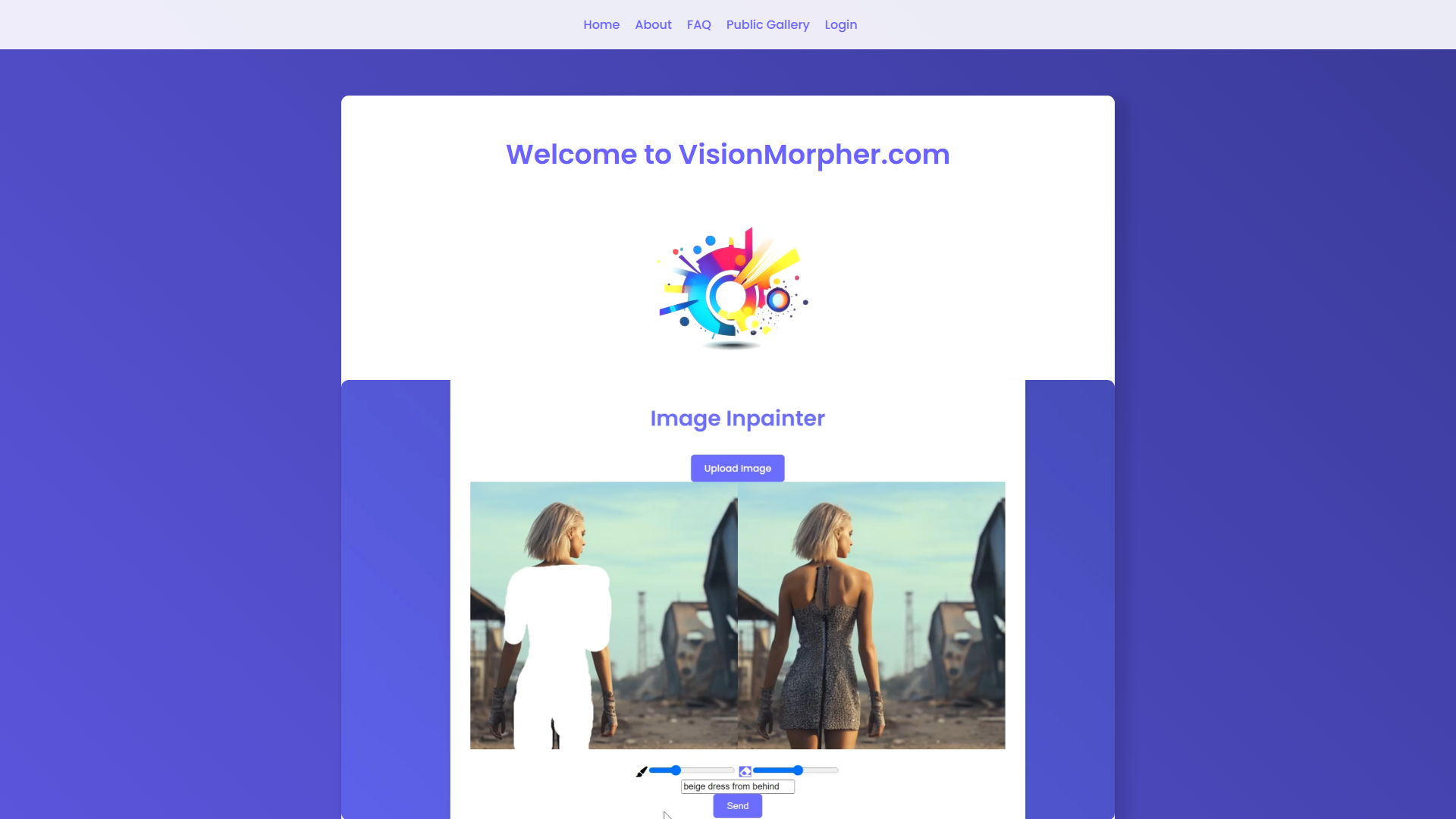
VisionMorpher offers an innovative approach to image editing, powered by advanced AI technology. It allows users to creatively manipulate images by adding, removing, or replacing elements with simple text prompts. This feature is particularly beneficial for users seeking to enhance their images without the cumbersome process of traditional editing methods.
With VisionMorpher, users can not only upload their images, but also interact with them in real-time, drawing or erasing parts to suit their creative vision. This personalization aspect ensures that users can make their ideas come to life with minimal effort, delivering professional-quality results without needing specialized skills.
This AI-driven platform revolutionizes how individuals handle image editing tasks, providing a user-friendly interface and a seamless experience. VisionMorpher caters to both amateur and professional users, making advanced editing accessible to everyone and empowering them to save time while producing remarkable visuals.
Pros
- User-friendly interface
- Time-saving capabilities
- Advanced editing features
- Creative freedom
- Professional-grade results
Cons
- Requires written prompts
- Limited image size
- No manual correction option
- Initial learning curve
- Dependence on AI accuracy
Key features
Effortless image manipulation
VisionMorpher simplifies image editing by allowing users to perform complex edits such as adding or removing elements with just a text prompt, dramatically reducing the time and effort usually involved.
Text prompt integration
Users can interact with their images using simple text prompts, enabling them to carry out specific edits without manual intervention, making the process intuitive and user-friendly.
Real-time interaction
The platform offers a real-time interaction feature, allowing users to draw, erase, and modify images instantly, adding a layer of flexibility and creativity to the editing process.
Professional-quality results
VisionMorpher ensures that all user edits result in high-quality visuals, providing professional-grade images that meet the unique creative vision of every user.
AI-driven technology
Utilizing state-of-the-art AI algorithms, the tool provides efficient and precise image transformation capabilities, setting it apart from traditional editors.
Alternative Ai Image Generator tools
Explore other ai image generator tools similar to VisionMorpher



FAQ
Here are some frequently asked questions about VisionMorpher.
Can I view or delete my generated images?
Yes, all generated images on VisionMorpher are saved directly under a user's profile page where they can easily view or delete them as necessary. This feature offers users greater control over their creations and ensures privacy as required.
Is it possible to get a refund for bought credits?
Refunds for bought credits on VisionMorpher are not available unless there's a server error or a clear technical fault from VisionMorpher’s side. Users are advised to consider this policy before purchasing credits for generating images.
How does VisionMorpher handle image copyrights?
Users retain full rights to images they upload and generate on VisionMorpher, with assurances that their creative expressions and privacy are protected at all times by the platform.
Can VisionMorpher be used for educational purposes?
Yes, VisionMorpher is suitable for educational settings, providing students and educators with a robust platform to explore creative design, image manipulation techniques, and cutting-edge AI applications in a user-friendly environment.
What should I do if the AI generates unwanted results?
Users of VisionMorpher should carefully write their text prompts to avoid undesirable image results. The platform itself does not assume responsibility for these results, so it's crucial for users to experiment with their prompts or reframe them as needed.
What is the current maximum supported image size?
As of now, VisionMorpher supports image sizes up to 512x512 pixels. The development team has plans to increase this limitation in the future, catering to users requiring larger image dimensions for their projects.
Does VisionMorpher require any special software installations?
No special installations are required to use VisionMorpher. The tool is browser-based, facilitating instant access and use through a compatible web browser, which simplifies the process for users.
How often does VisionMorpher update its features?
The platform undergoes regular updates to incorporate the latest advancements in AI technology and user feedback, ensuring a state-of-the-art image editing experience that evolves with technological trends and user needs.







