

My Fake Snap
"My Fake Snap" is an innovative AI-powered tool designed to help users create realistic fake images effortlessly. Accessible through its website, this tool supports a user-friendly interface that guides you through a simple four-step process. Initially, users are prompted to upload an image in PNG, JPG, or JPEG formats, with a maximum file size limit of 4MB. Once uploaded, the image can be cropped to focus on specific areas, enhancing the effectiveness of the next step. The core feature of "My Fake Snap" lies in its ability to apply fake options to the cropped image. Users can place a box near the face or any focal area of the image to achieve the best manipulation results. This feature utilizes advanced AI algorithms to ensure the alterations are seamless and realistic. After applying the desired fake options, users can preview the final outcome. If satisfied, the image can be saved and downloaded directly from the site. For those looking to explore more creative possibilities or require specific project needs, "My Fake Snap" also offers a service to request new projects, catering to more tailored requirements. This tool not only simplifies the creation of altered images but also expands creative boundaries for users across various needs and industries.
Visit Website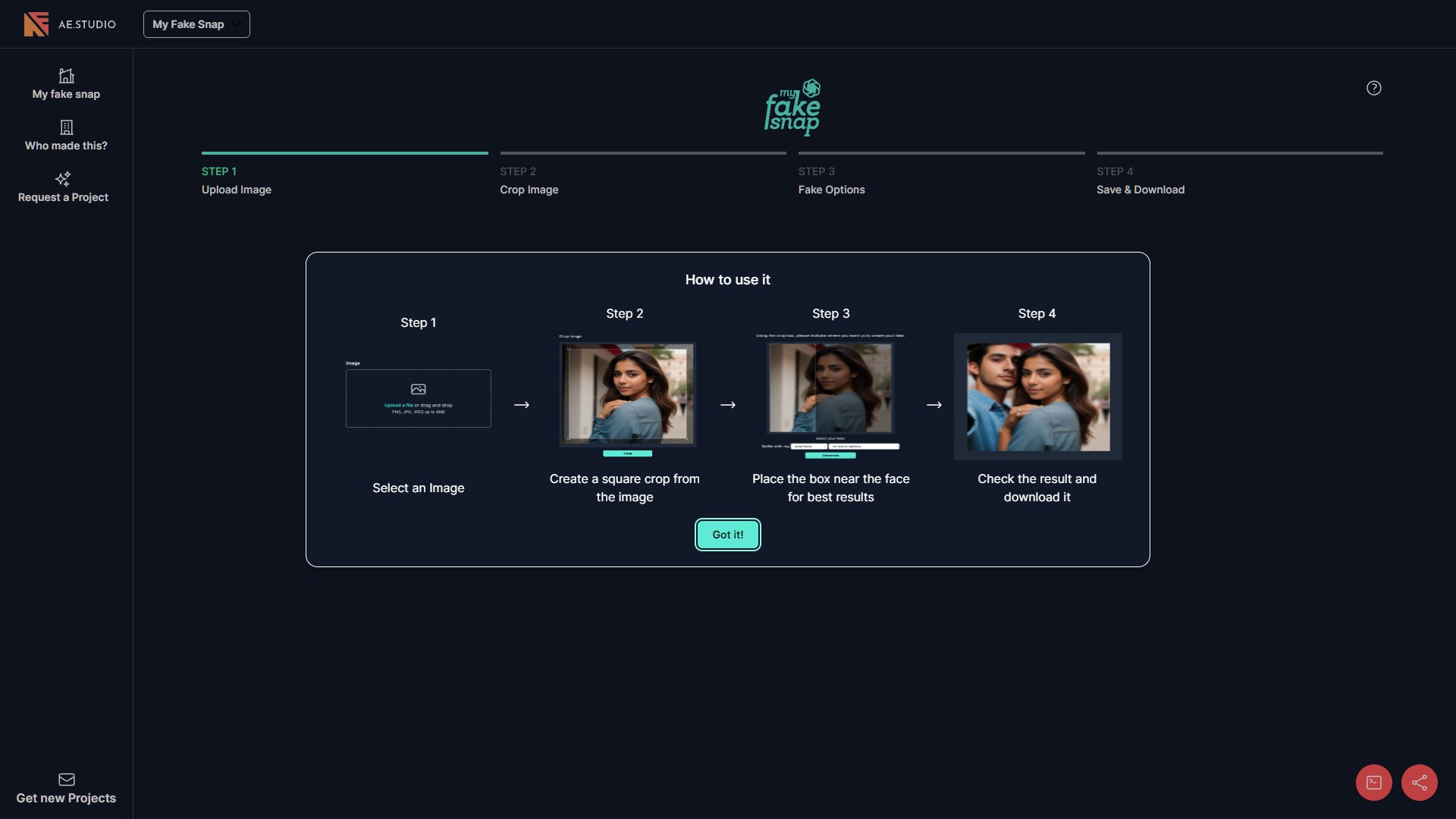
Overview
"My Fake Snap" is an innovative AI-powered tool designed to help users create realistic fake images effortlessly. Accessible through its website, this tool supports a user-friendly interface that guides you through a simple four-step process. Initially, users are prompted to upload an image in PNG, JPG, or JPEG formats, with a maximum file size limit of 4MB. Once uploaded, the image can be cropped to focus on specific areas, enhancing the effectiveness of the next step.
The core feature of "My Fake Snap" lies in its ability to apply fake options to the cropped image. Users can place a box near the face or any focal area of the image to achieve the best manipulation results. This feature utilizes advanced AI algorithms to ensure the alterations are seamless and realistic.
After applying the desired fake options, users can preview the final outcome. If satisfied, the image can be saved and downloaded directly from the site. For those looking to explore more creative possibilities or require specific project needs, "My Fake Snap" also offers a service to request new projects, catering to more tailored requirements. This tool not only simplifies the creation of altered images but also expands creative boundaries for users across various needs and industries.
Pros
- Real-time preview
- Multi-layer editing
- Customizable filters
- Mobile compatibility
- Secure processing
Cons
- Limited file size
- No video support
- Basic user interface
- Slow processing times
- No offline capability
Key features
Image upload support
Users can upload images in PNG, JPG, or JPEG formats, ensuring compatibility with common file types up to 4MB in size.
Interactive cropping tool
The tool provides an interactive cropping feature, allowing users to precisely select and edit specific areas of their images for manipulation.
Advanced fake options
Users can choose from a variety of fake options to apply to their images, enhancing the creativity and diversity of the edits.
Save and download
After editing, users can easily save their creations and download the modified images directly from the website.
Guided usage instructions
The website includes detailed step-by-step instructions to assist users in effectively using the tool for optimal results.
Project request feature
Offers an additional service where users can request specific projects or new features, enhancing user engagement and tool functionality.
Alternative Ai Image Generator tools
Explore other ai image generator tools similar to My Fake Snap



FAQ
Here are some frequently asked questions about My Fake Snap.
What file formats does My Fake Snap support for uploads?
My Fake Snap supports PNG, JPG, and JPEG formats for image uploads, ensuring compatibility with most image files.
How do I crop an image in My Fake Snap?
In My Fake Snap, after uploading your image, you can use the cropping tool to select and focus on specific areas before applying fake options.
Can I preview the changes before saving the image on My Fake Snap?
Yes, My Fake Snap allows you to preview the altered image before saving, ensuring you are satisfied with the outcome.
What should I do if I need a more customized project on My Fake Snap?
For tailored requirements, you can request a new project on My Fake Snap, which caters to more specific and creative needs.
Is there a file size limit for images uploaded to My Fake Snap?
Yes, the maximum file size allowed for uploads on My Fake Snap is 4MB to ensure smooth processing and optimal performance.
What is the main feature of My Fake Snap?
The main feature of My Fake Snap is its AI-powered tool that applies realistic alterations to images, focusing on specific areas for optimal results.
How do I download the final image from My Fake Snap?
After you are satisfied with the preview, you can save and download the final image directly from My Fake Snap.
How does My Fake Snap ensure the realism of the altered images?
My Fake Snap uses advanced AI algorithms to seamlessly integrate fake options into images, ensuring the alterations are realistic and high-quality.







