

ImgCreator.AI
ImgCreator.AI is a versatile tool designed to transform your creative ideas into reality with the power of artificial intelligence. Whether you're looking to create unique illustrations, captivating anime, or conceptual design images, this tool has you covered. By simply inputting a text description, users can generate stunning images swiftly and effortlessly. The platform also provides advanced options such as AI photo studio capabilities, seamless background removal, and the innovative magic eraser feature. With ImgCreator.AI, you can explore new dimensions of creativity, benefitting from its vast array of filters and aspect ratios. Plus, with the platform offering 30 free images upon sign-up and the potential to earn more through referrals, it's accessible to all. Ideal for both amateurs and experts, ImgCreator.AI ensures you have the resources needed to create breathtaking visuals, enhancing your project with AI-driven precision and creativity.
Visit Website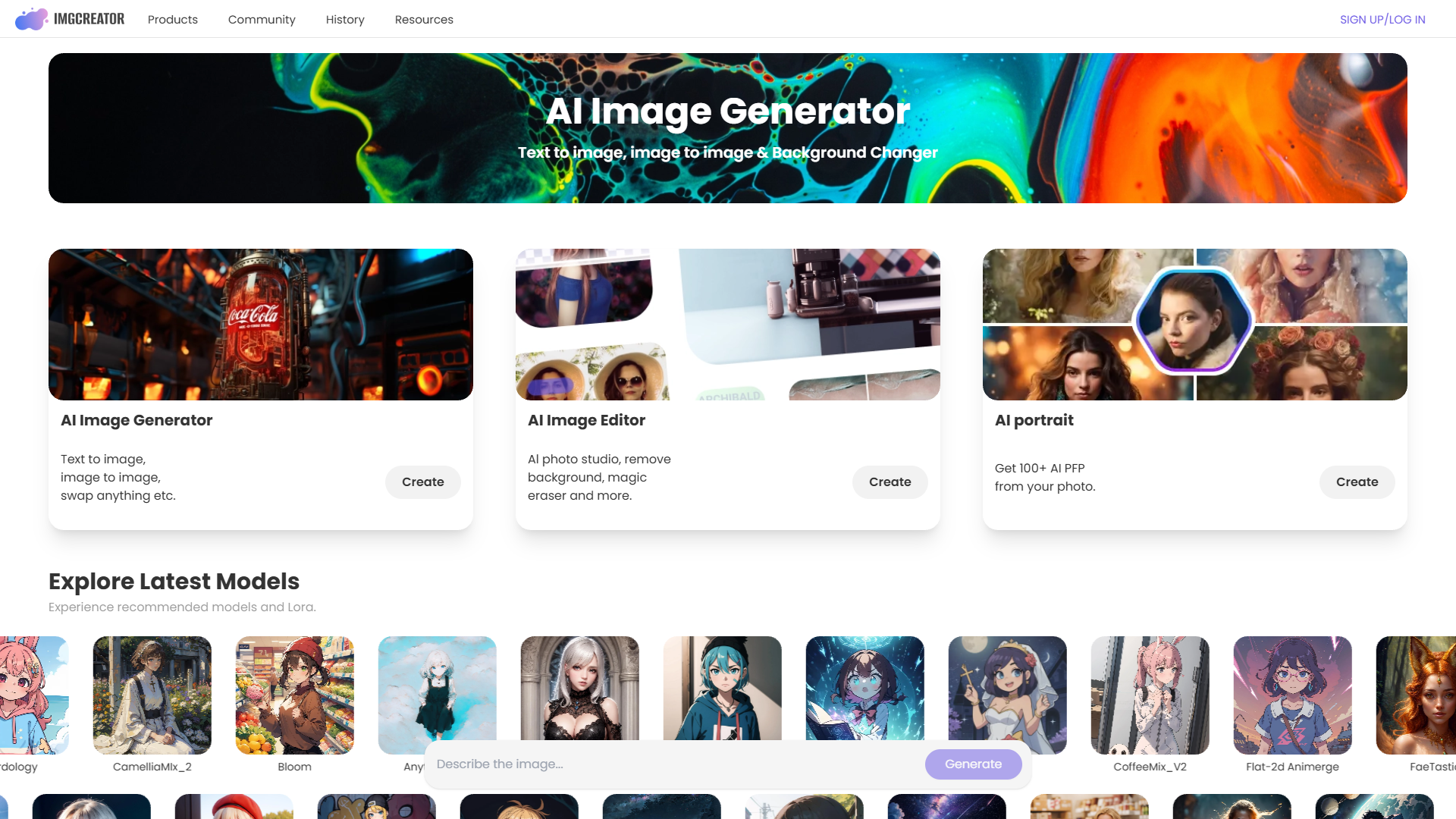
Overview
ImgCreator.AI is a versatile tool designed to transform your creative ideas into reality with the power of artificial intelligence. Whether you're looking to create unique illustrations, captivating anime, or conceptual design images, this tool has you covered. By simply inputting a text description, users can generate stunning images swiftly and effortlessly. The platform also provides advanced options such as AI photo studio capabilities, seamless background removal, and the innovative magic eraser feature. With ImgCreator.AI, you can explore new dimensions of creativity, benefitting from its vast array of filters and aspect ratios. Plus, with the platform offering 30 free images upon sign-up and the potential to earn more through referrals, it's accessible to all. Ideal for both amateurs and experts, ImgCreator.AI ensures you have the resources needed to create breathtaking visuals, enhancing your project with AI-driven precision and creativity.
Pros
- Accessible for beginners
- High-quality image output
- Flexible pricing options
- Enhanced creative freedom
- Free credits for new users
Cons
- Limited free credits
- Complex advanced features
- Requires technical understanding
- Dependency on good prompts
- Learning curve for optimization
Key features
Text-to-image conversion
ImgCreator.AI allows users to effortlessly convert text descriptions into high-quality images, making it easy for anyone to visualize their ideas.
Versatile background changer
This tool offers the ability to modify backgrounds with ease, enabling users to customize images to their liking.
Batch image generation
Create multiple images simultaneously, saving time and enhancing productivity, especially for those working on large-scale projects.
AI-driven image editor
Benefit from advanced AI-driven features like magic eraser, AI photo studio, and more, providing users with professional-grade editing tools.
High-resolution output
Generate images with resolutions up to 4096px, ensuring that your visuals remain crisp and clear for any use case or display.
Alternative Ai Image Generator tools
Explore other ai image generator tools similar to ImgCreator.AI



FAQ
Here are some frequently asked questions about ImgCreator.AI.
Can I generate AI images for free on ImgCreator.AI?
Yes, ImgCreator.AI offers 30 free image credits upon sign-up. Once these are used, more credits can be earned through referrals or purchased as needed. This facility makes initial exploration free of charge.
Is ImgCreator.AI suitable for commercial image creation?
Yes, ImgCreator.AI creates images with full usage rights for commercialization. Users can sell, reproduce, or merchandise their images, offering flexibility for business or personal use.
How do ImgCreator.AI's credits system and pricing work?
ImgCreator.AI's pricing plans include both free and paid options. Credits determine usage, with more advanced functions consuming multiple credits. Users can choose plans based on image volume needs and budget.
Where can users find help if they encounter issues with ImgCreator.AI?
Users can join the ImgCreator.AI Discord community or email support for quick assistance. The community is an excellent resource for troubleshooting and sharing tips with other users.
What are the main features of ImgCreator.AI?
ImgCreator.AI boasts features like text-to-image and image-to-image conversion, background changing, batch image generation, and advanced photo studio tools. Filters, customizable aspect ratios, and magic erasers enhance its image editing capabilities.
How can I optimize image creation with ImgCreator.AI?
To optimize image creation, use specific and descriptive text prompts, experiment with filters and settings, and take advantage of batch generation for efficiency. Familiarity with editing tools will enhance outcomes.
Can ImgCreator.AI help with background-changing tasks?
Indeed, ImgCreator.AI includes versatile background-changing tools, allowing users to easily alter image backgrounds, enhancing creative flexibility and customization capabilities for diverse projects.
What image resolutions does ImgCreator.AI support?
ImgCreator.AI offers varying image resolutions based on subscription plans. The free version provides images at 512×512 pixels, while subscription users can access higher resolutions up to 1024×1024 pixels. For specific needs, such as print-on-demand or higher resolutions, custom requests can be accommodated.







