

Slater
Slater is designed to make integrating custom code into Webflow projects a breeze. With a user-friendly platform, it allows both individual users and teams to streamline project development. Whether you're a hobbyist or a professional developer, Slater offers tools that cater to various needs. From file hosting solutions to AI assistance, Slater covers all the bases needed for efficient project management. What sets Slater apart is its community-driven approach, rewarding users for engagement and contributions, making it more than just a development tool. Enjoy the flexibility of having a playground to experiment with your projects, and seamlessly bring your ideas to life with advanced AI support. Access a broad library for code and project management while benefitting from simple pricing plans tailored to individuals and teams. Community engagement is encouraged with credits, adding an interactive element to the user experience. Slater is not just a tool; it's a supportive ecosystem that bridges creativity and technology effortlessly.
Visit Website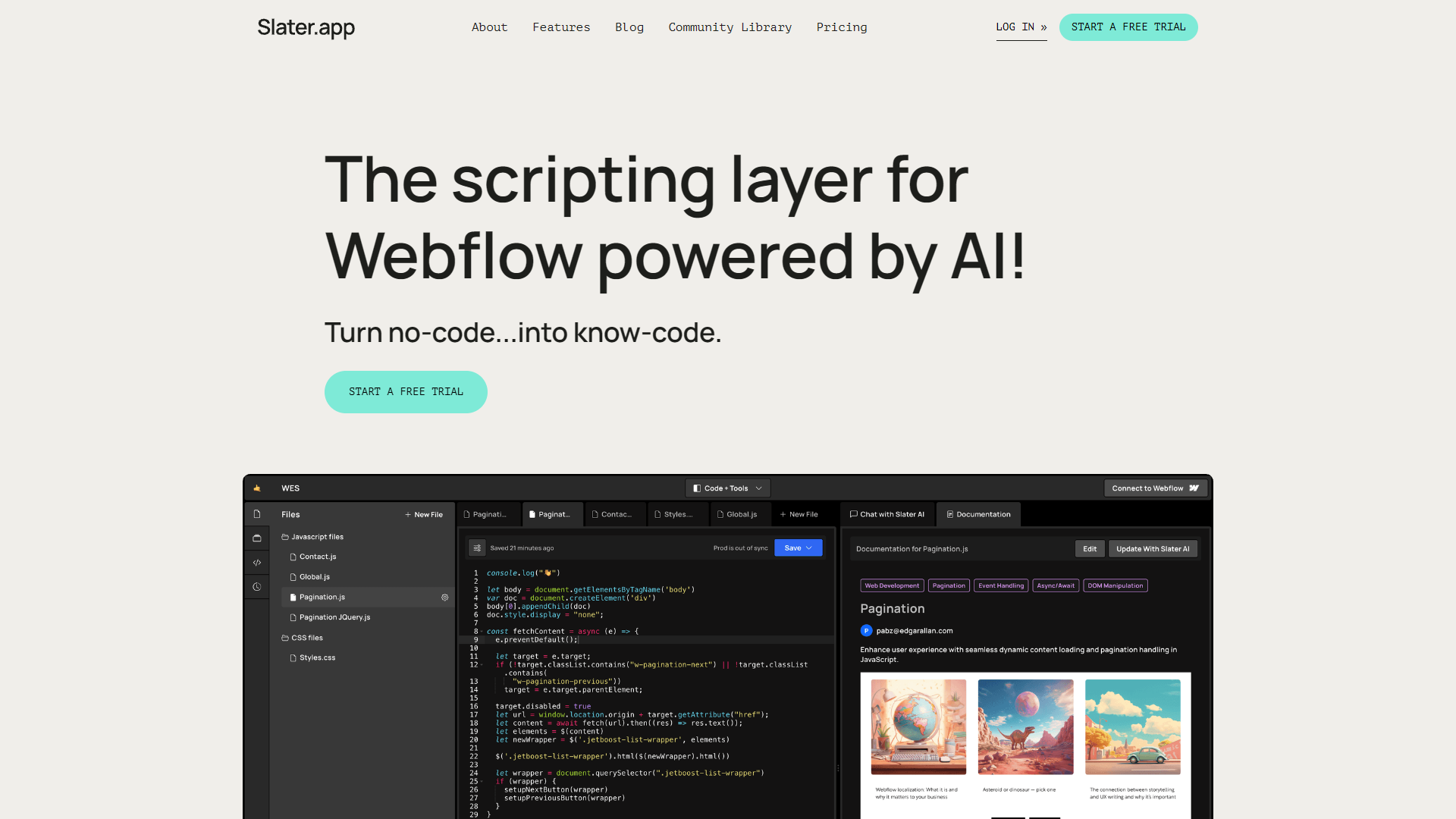
Overview
Slater is designed to make integrating custom code into Webflow projects a breeze. With a user-friendly platform, it allows both individual users and teams to streamline project development. Whether you're a hobbyist or a professional developer, Slater offers tools that cater to various needs. From file hosting solutions to AI assistance, Slater covers all the bases needed for efficient project management. What sets Slater apart is its community-driven approach, rewarding users for engagement and contributions, making it more than just a development tool.
Enjoy the flexibility of having a playground to experiment with your projects, and seamlessly bring your ideas to life with advanced AI support. Access a broad library for code and project management while benefitting from simple pricing plans tailored to individuals and teams. Community engagement is encouraged with credits, adding an interactive element to the user experience. Slater is not just a tool; it's a supportive ecosystem that bridges creativity and technology effortlessly.
Pros
- Encourages user engagement
- Reliable code support
- Supports team collaboration
- Rich feature set
- Flexible usage options
Cons
- Limited free features
- Can be complex
- Requires learning curve
- Platform dependent
- Technical jargon
Key features
Custom code integration
Slater simplifies the integration of custom code into Webflow projects, making it accessible even for those with limited coding experience. It bridges the gap between creativity and technology efficiently.
User-friendly platform
The platform is designed with user experience in mind, ensuring an intuitive setup and navigation process. Users can focus on developing their projects without getting lost in complex architectures.
Advanced AI assistance
Slater employs powerful AI models to assist users in crafting and managing code. This feature enhances productivity by offering intelligent suggestions and code optimizations.
Community rewards system
Slater encourages a community-centric environment by rewarding users who contribute through referrals, articles, or project transfers. This system enhances user motivation and fosters collaboration.
Seamless project management
Manage your projects effortlessly with tools that support project staging and custom domain publishing, maintaining a smooth workflow for both small and large teams.
Company Information
Alternative Ai Development tools
Explore other ai development tools similar to Slater





FAQ
Here are some frequently asked questions about Slater.
What is Slater designed for?
Slater is designed to simplify custom code integration into Webflow projects, enabling users to efficiently manage and optimize their creative web designs with advanced AI assistance and user-friendly tools.
How does Slater's AI assistance work?
Slater's AI support leverages advanced models to provide intelligent code suggestions and enhancements, streamlining the code development process and boosting overall efficiency in project management.
Can Slater be used for team collaboration?
Yes, Slater supports team collaboration with file and team access controls, allowing multiple users to work on projects simultaneously, ensuring organized and efficient teamwork.
Is there AI support in all Slater plans?
Yes, AI messaging is available in all plans, though the extent and model sophistication may vary between free and paid plans, impacting the level of AI guidance provided.
Does Slater offer a free plan?
Yes, Slater provides a free plan known as 'Playground', allowing users to publish projects, access files, and utilize AI messaging. However, certain advanced features require a paid subscription.
What are the benefits of the Host User plan?
The Host User plan grants unlimited Slater file hosting, file access management, team control settings, and AI file documentation, which are essential features for advanced project handling.
How does Slater reward community engagement?
Slater offers credits for activities such as referrals, transferring projects to paid clients, and contributing articles, incentivizing user participation and fostering a supportive community.
What makes Slater unique compared to other coding tools?
Slater stands out by combining AI technology with a community-driven approach, offering unique credits for engagement. This, paired with specific support for Webflow projects, makes it an appealing choice for web developers.







